任务调度(Task)
@midwayjs/task 是为了解决任务系列的模块,例如分布式定时任务、延迟任务调度。例如每日定时报表邮件发送、订单 2 小时后失效等工作。
说明:由于底层是依赖 bull,其通过 redis 进行实现,所以配置中,需要加一个 redis 的配置。
安装组件#
首先安装 Midway 提供的任务组件:
$ npm install @midwayjs/task -S在 configuration.ts 中,引入这个组件:
// src/configuration.tsimport { Configuration } from '@midwayjs/decorator';import * as task from '@midwayjs/task'; // 导入模块import { join } from 'path';
@Configuration({ imports: [task], importConfigs: [join(__dirname, 'config')],})export class AutoConfiguration {}配置#
在 config.default.ts 文件中配置对应的模块信息:
export const taskConfig = { redis: `redis://127.0.0.1:32768`, //任务依赖redis,所以此处需要加一个redis prefix: 'midway-task', // 这些任务存储的key,都是midway-task开头,以便区分用户原有redis里面的配置。 defaultJobOptions: { repeat: { tz: 'Asia/Shanghai', // Task等参数里面设置的比如(0 0 0 * * *)本来是为了0点执行,但是由于时区不对,所以国内用户时区设置一下。 }, },};有账号密码情况:
export const taskConfig = { redis: { port: 6379, host: '127.0.0.1', password: 'foobared', }, //此处相当于是ioredis的配置 https://www.npmjs.com/package/ioredis prefix: 'midway-task', // 这些任务存储的key,都是midway-task开头,以便区分用户原有redis里面的配置。 defaultJobOptions: { repeat: { tz: 'Asia/Shanghai', // Task等参数里面设置的比如(0 0 0 * * *)本来是为了0点执行,但是由于时区不对,所以国内用户时区设置一下。 }, },};业务代码编写方式#
分布式定时任务#
import { Provide, Inject, Task } from '@midwayjs/decorator';
@Provide()export class UserService {  @Inject()  helloService: HelloService;
// 例如下面是每分钟执行一次,并且是分布式任务 @Task({ repeat: { cron: '* * * * *' }, }) async test() { console.log(this.helloService.getName()); }}本地定时任务#
import { Provide, Inject, TaskLocal } from '@midwayjs/decorator';
@Provide()export class UserService {  @Inject()  helloService: HelloService;
// 例如下面是每秒钟执行一次 @TaskLocal('* * * * * *') async test() { console.log(this.helloService.getName()); }}手动触发任务#
任务的定义,通过 @Queue 装饰器,定义一个任务类,内必须含有 execute 方法,并且是 async 的。为什么需要是 async 的因为,这个代码,是为了分布式,相当于有个内部的任务调度过程。
import { Provide, Inject, Queue } from '@midwayjs/decorator';
@Queue()@Provide()export class HelloTask {  @Inject()  service;
  async execute(params) {    console.log(params);  }}
触发:
import { QueueService } from '@midwayjs/task';import { Provide, Inject } from '@midwayjs/decorator';
@Provide()export class UserTask {  @Inject()  service;
  @Inject()  queueService: QueueService;
async execute(params) { // 3秒后触发分布式任务调度。 const xxx = await this.queueService.execute(HelloTask, params, { delay: 3000 }); }}这样,就相当于是 3 秒后,触发 HelloTask 这个任务。
设置进度#
例如我们在做音视频或者发布这种比较耗时的任务的时候,我们希望能设置进度。
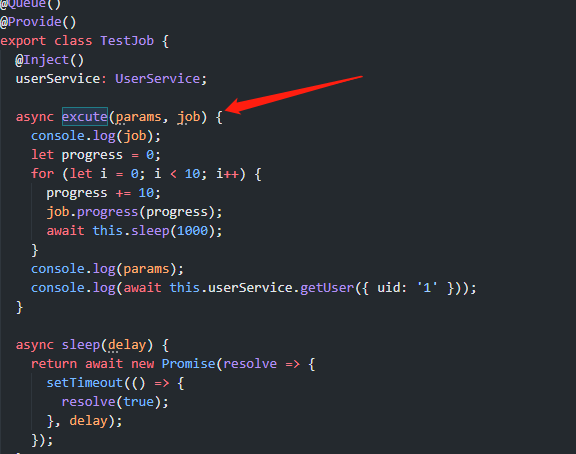
相当于第二个参数,将 bull 的 job 传递给了用户。用户可以通过 job.progress 来设置进度。
然后查询进度:
import { QueueService } from '@midwayjs/task';import { Provide, Controller, Get } from '@midwayjs/decorator';
@Provide()@Controller()export class HelloController {  @Inject()  queueService: QueueService;
@Get('/get-queue') async getQueue(@Query() id: string) { return await this.queueService.getClassQueue(TestJob).getJob(id); }}任务的相关内容#
let job = await this.queueService.getClassQueue(TestJob).getJob(id);然后 job 上面有类似停止的方法,或者查看进度的方法。
启动就触发#
有朋友由于只有一台机器,希望重启后立马能执行一下对应的定时任务。
import { Context, ILifeCycle, IMidwayBaseApplication, IMidwayContainer } from '@midwayjs/core';import { Configuration } from '@midwayjs/decorator';import { Queue } from 'bull';import { join } from 'path';import * as task from '@midwayjs/task';import { QueueService } from '@midwayjs/task';
@Configuration({ imports: [task], importConfigs: [join(__dirname, './config')],})export class ContainerConfiguration implements ILifeCycle { async onReady(container: IMidwayContainer, app?: IMidwayBaseApplication<Context>): Promise<void> { // Task这块的启动后立马执行 let result: any = await container.getAsync(QueueService); let job: Queue = result.getQueueTask(`HelloTask`, 'task'); // 此处第一个是你任务的类名,第二个任务的名字也就是装饰器Task的函数名 job.add({}, { delay: 0 }); // 表示立即执行。 }}运维#
日志#
在 Midway Task Component 上面,增加了两个日志:
- midway-task.log
- midway-task-error.log
分别在 task、localTask、queue 触发开始和结束的时候会打印对应的日志。
分布式的 Task 触发日志:
logger.info(`task start.`);
// 异常情况:logger.error(`${e.stack}`);
logger.info(`task end.`);非分布式的 LocalTask 触发日志:
logger.info(`local task start.`);
// 异常情况:// logger.error(`${e.stack}`)
logger.info(`local task end.`);
任务队列的触发日志:
logger.info(`queue process start.`);
// 异常情况:// logger.error(`${e.stack}`)
logger.info(`queue process end.`);
排查问题链路:#
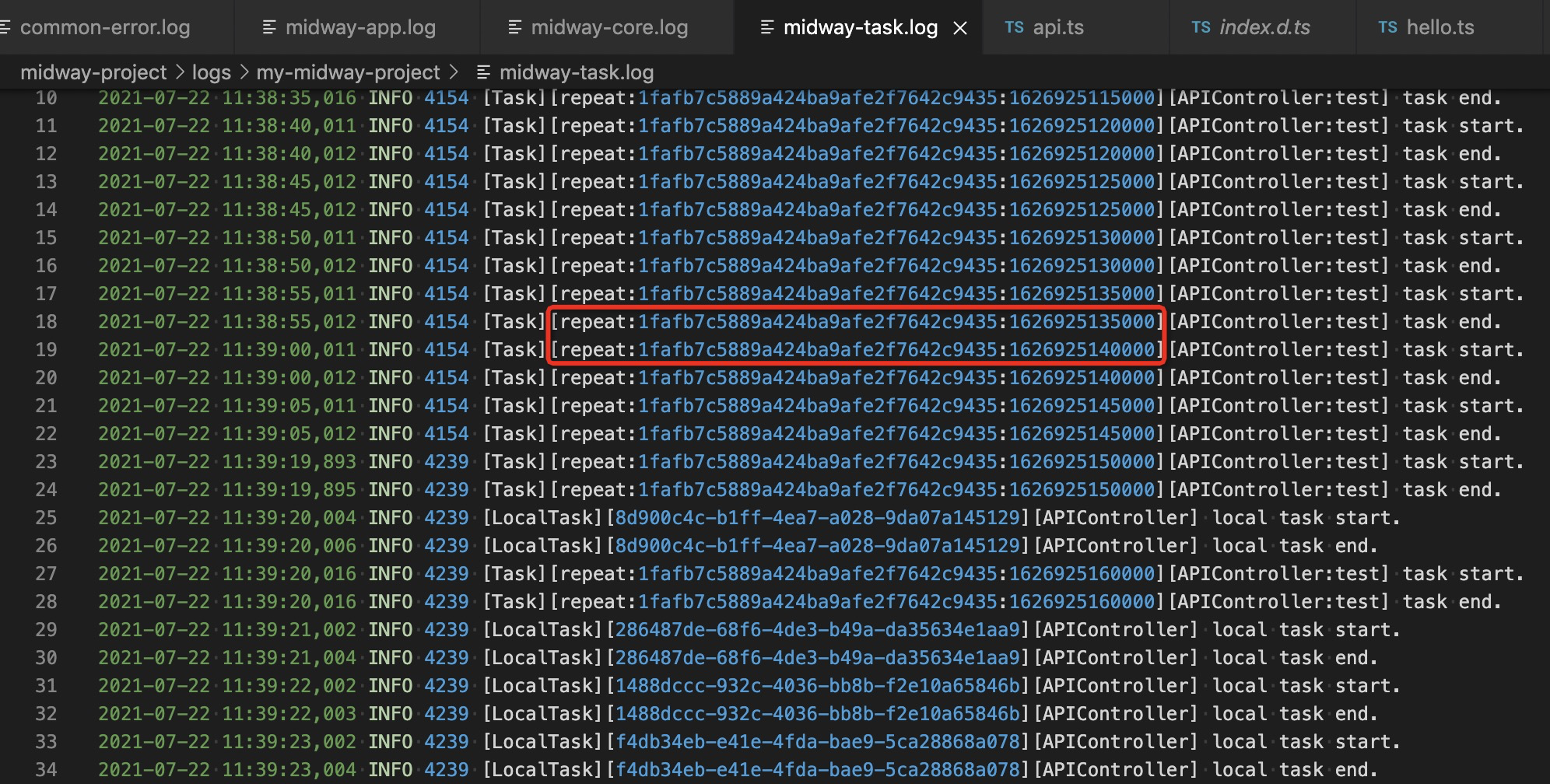
用户可以搜索这个相同的 id,找到同一次请求的日志。 为了方便用户在自己的业务代码中串联对应的日志,我在 ctx 上面挂了 traceId 变量。
例如异常情况: 当异常的时候, 本地 可以在 console 栏内看到这个错误相关的情况:

日志: 可以在 midway-task.log 文件中查看完整日志:
如果调用情况比较多的时候,会出现 A 还没执行完成,B 又进来,导致日志区分比较麻烦,所以用户可以搜索调用的 traceId,也就是下图红色圈起来的地方:

相当于 ctrl + f 搜索相同的 traceId 即可。
traceId#
localTask 则是自己生成了一个 uuid 的 id 作为 traceId。
task 和 queue 则采用 job 的 id 作为 traceId。
业务内部的代码#
在 service 内可以通过 inject 注入 logger,或者注入 ctx 拿 logger 变量
import { App, Inject, Provide, Queue } from '@midwayjs/decorator';import { Application } from '@midwayjs/koa';
@Queue()@Provide()export class QueueTask {  @App()  app: Application;
  @Inject()  logger;
async execute(params) { this.logger.info(`====>QueueTask execute`); this.app.getApplicationContext().registerObject(`queueConfig`, JSON.stringify(params)); }}或者
import { App, Inject, Provide, Queue } from '@midwayjs/decorator';import { Application } from '@midwayjs/koa';
@Queue()@Provide()export class QueueTask {  @App()  app: Application;
  @Inject()  ctx;
  async execute(params) {    this.ctx.logger.info(`====>QueueTask execute`);    this.app.getApplicationContext().registerObject(`queueConfig`, JSON.stringify(params));  }}
打印的日志
2021-07-30 13:00:13,101 INFO 5577 [Queue][12][QueueTask] queue process start.2021-07-30 13:00:13,102 INFO 5577 [Queue][12][QueueTask] ====>QueueTask execute2021-07-30 13:00:13,102 INFO 5577 [Queue][12][QueueTask] queue process end.
其他#
Cron 表达式#
关于 Task 任务的配置:
* * * * * *┬ ┬ ┬ ┬ ┬ ┬│ │ │ │ │ |│ │ │ │ │ └ day of week (0 - 7) (0 or 7 is Sun)│ │ │ │ └───── month (1 - 12)│ │ │ └────────── day of month (1 - 31)│ │ └─────────────── hour (0 - 23)│ └──────────────────── minute (0 - 59)└───────────────────────── second (0 - 59, optional)常见表达式:
- 每隔 5 秒执行一次:/5 * * * ?
- 每隔 1 分钟执行一次:0 /1 * * ?
- 每小时的 20 分执行一次:0 20 * * * ?
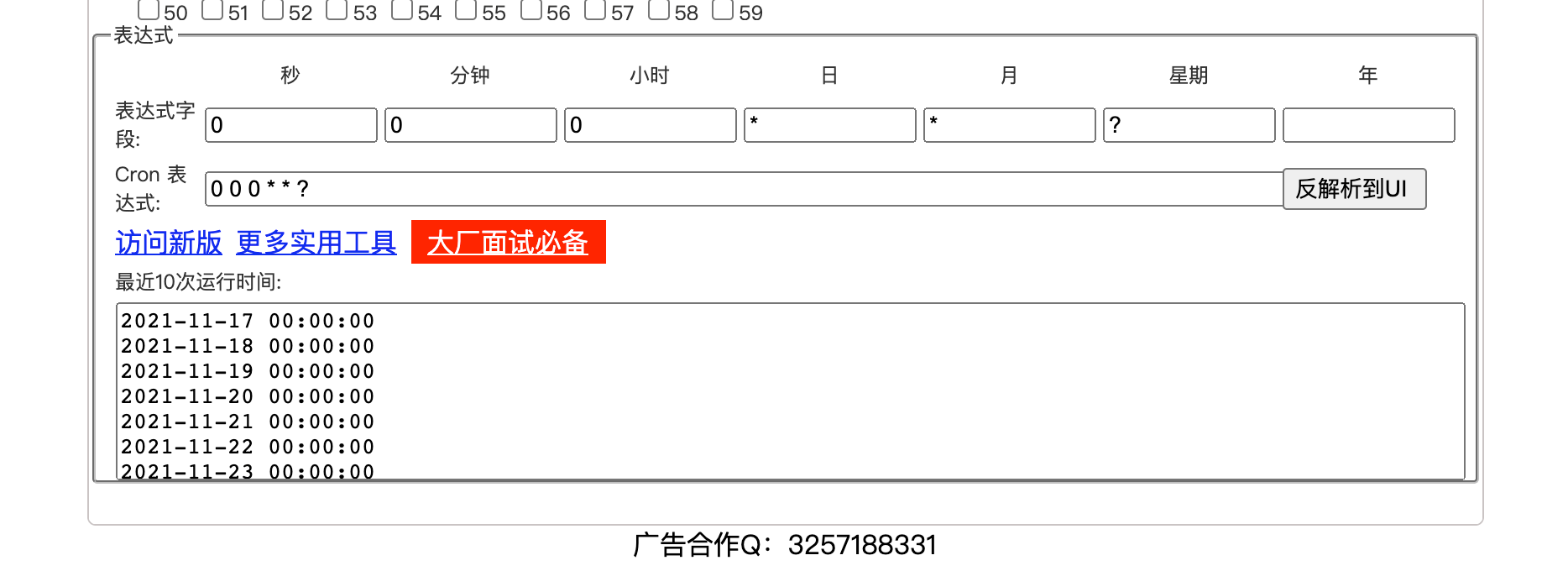
- 每天 0 点执行一次:0 0 0 * * ?
- 每天的两点 35 分执行一次:0 35 2 * * ?
可以使用 在线工具 执行确认下一次执行的时间。
EVALSHA 错误#

这个问题基本明确,问题会出现在 redis 的集群版本上。原因是 redis 会对 key 做 hash 来确定存储的 slot,集群下这一步@midwayjs/task 的 key 命中了不同的 slot。临时的解决办法是 taskConfig 里的 prefix 配置用{}包括,强制 redis 只计算{}里的 hash,例如 prefix: '{midway-task}'
历史日志删除#
当每次 redis 执行完他会有日志,那么如何让其在完成后删除:
import { Provide, Task } from '@midwayjs/decorator';import { IUserOptions } from '../interface';
@Provide()export class UserService {  async getUser(options: IUserOptions) {    return {      uid: options.uid,      username: 'mockedName',      phone: '12345678901',      email: 'xxx.xxx@xxx.com',    };  }
@Task({ repeat: { cron: '* * * * * *' }, removeOnComplete: true, // 加了一行这个 }) async test() { console.log(`====`); }}目前是否默认删除,需要跟用户沟通